Contents
Short answer: you paid other traders, not the exchangeWhy you paid instead of receivedWhen exactly it is charged, and when it is notHow to find the exact line in your historyWhat to do before your next tradeShort answer: you paid other traders, not the exchange
A perpetual contract has no expiry date, so something has to keep its price close to the price you'd pay for the coin on the normal buy-and-hold market (spot). That something is funding: every few hours, one side of the market pays the other a small amount. If the contract is trading above that spot price, the people betting on a rise pay the people betting on a fall; if it is trading below, the money goes the other way. The exchange only transfers the money between the two sides — it is not a commission on top of your trading fee.
That is why the charge can appear on a day when you did nothing at all. You opened a position last night, you went to sleep, the clock reached a settlement time, and a line appeared in your account. Trading fees come from your own clicks; funding comes from the clock plus the fact that your position was still open.
Why you paid instead of received
Two things decide the direction: the sign of the funding rate at that moment, and which side you are on. A positive rate means longs pay shorts. A negative rate means shorts pay longs. If you were long on a coin that everyone else was also buying with leverage, a positive rate is the normal state of things, and you were on the paying side.
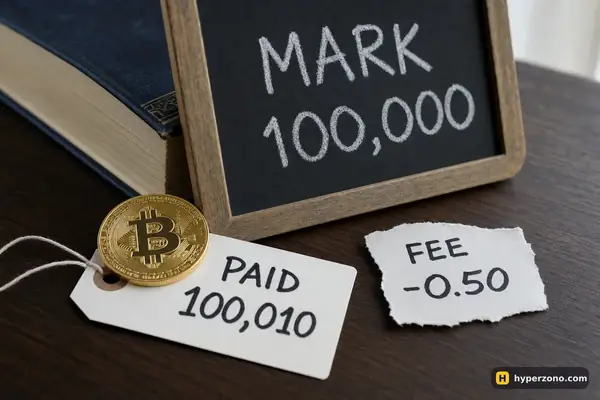
The amount is simple arithmetic: your position value multiplied by the rate. Take an illustrative example. You hold 1,000 USDT worth of a contract and the rate at settlement is 0.01%. The payment is 1,000 × 0.0001 = 0.10 USDT. One cycle costs you ten cents. Hold it through three cycles in a day and you have paid 0.30 USDT, still on the same 1,000 USDT position.
One funding payment on a 1,000.00 USDT position. Traders pay each other, not the exchange. Each contract has its own rate and interval.
Here's the part that surprises people the most: the calculation uses the whole position, not the margin you put in. If those 1,000 USDT of position came from 100 USDT of your own money at 10x, you still pay 0.10 USDT — but against a 100 USDT deposit, that is 0.1% of your balance per cycle instead of 0.01%. The higher your leverage, the heavier the same funding feels compared with what you actually deposited. Rates are not fixed either: on a calm market the rate tends to sit near a small baseline, and in a hot market it can run several times higher for days.
When exactly it is charged, and when it is not
You pay or receive only if you are holding the position at the settlement moment. Nothing accrues minute by minute in between, and a position you already closed costs you nothing for the cycle ahead. On Binance USDⓈ-M contracts the default schedule is every 8 hours — 00:00, 08:00 and 16:00 UTC — but some contracts settle every 4 hours, and if the rate pushes against its limit the interval can become 1 hour. Never assume the schedule; the contract page shows a countdown to the next settlement next to the price, and that countdown is the number to trust.
Closing one second before the countdown ends is not reliable. On the Aster contracts inside Binance Wallet the charge can land about 15 seconds after the scheduled time, so a position closed at 16:00:05 UTC may still be charged for that interval. On other contracts, check the countdown and don't cut it to the last seconds — if you want to avoid a funding payment, close comfortably before the settlement. Whether that is worth the extra entry and exit fees is a separate question, and often the answer is no.
How to find the exact line in your history
You can prove to yourself that the number is correct in about two minutes. The goal is to line up four things: the time of the deduction, the rate at that time, your position value, and your side.
Open the futures transaction history
In the futures section of the app or website, look for the history of money movements on the account — not the order history, which only shows fills. On Binance this is the transaction history of the futures wallet; there you can filter the entries so only funding is shown. If the filter name looks different in your version of the app, check the futures wallet's history screen.
Note the timestamp and the amount
Each funding line has its own time stamp and a signed amount: minus means you paid, plus means you received. Write down the time in UTC so it matches the exchange's own schedule.
Look up the rate for that same moment
Every contract has a page with its funding rate history. Find the settlement that matches your timestamp and note the rate, with its sign.
Multiply and compare
Take the position value you were holding at that moment and multiply it by the rate. The result should match the line in your history, within rounding. If you added to or partially closed the position between settlements, the value used is the one at the settlement moment, not your average over the day.
Export it if you keep records
In-app history screens do not always go back far. If you want a record for your own accounting, export the history to a file while it is still there — then the numbers are yours regardless of what the app shows next month.
Not every exchange shows funding as its own separate line — on some, it is folded into the result of the position, so a trade that closed in profit on price can still show a smaller net number. If you can't find a funding line anywhere, open the closed-trade detail for that position and read the breakdown there. And if your balance moved in a direction your trades don't explain at all, our page on profitable trades with a shrinking balance walks through the same kind of reconciliation across fees and funding together.
A tiny charge today can be a real cost over a week. Funding is charged again at every settlement for as long as you hold, and several cycles a day on a leveraged position add up quietly. Each payment comes out of the money holding your position open, so your liquidation price moves a little closer to the current price. After a settlement, check your liquidation price, not just the chart.
What to do before your next trade
The fix is not to be surprised next time. Before you open a position, look at the current rate and its sign on the contract page, look at the countdown, and decide how many settlements your plan will sit through. The rate, the sign and the countdown sit together next to the price, and you can see all three without depositing anything if you open a Binance Futures account and just read the contract page. Then put the numbers into the funding calculator and see the cost in USDT for your planned holding time. If the expected funding eats a noticeable part of your target, either shorten the trade, cut the size, or pick a contract where the rate is calmer.
If you want the mechanism itself — why the rate exists, how it swings and why it can occasionally pay you — that is covered in full on what funding is and when you get paid. This page is only about reading a charge that already happened. And if something else on your account looks unexplained, the rest of the troubleshooting section goes through the usual suspects one by one.
Most of the time funding is a small cost you plan for, the same way you plan for the trading fee: a known number you check before you click, not a surprise you find in the morning. Some people build a trade around collecting it instead — holding the coin on spot and a short perpetual against it — but that is a separate setup with its own fees, its own risks and its own page on earning funding with spot plus a short.
Is the funding fee a hidden exchange commission?
No. Funding moves between the traders who are long and the traders who are short on the same contract; the exchange passes it across. The exchange's own charge is the trading fee you pay when you open and when you close, and that one is calculated on the size of each execution.
Why was I charged when I didn't place any trade that day?
Because funding depends on holding, not on clicking. If your position was open at the settlement moment, the payment applies. Nothing accrues while you wait in between — it is a snapshot taken at the scheduled time.
Can funding pay me instead?
Yes. If the rate is negative and you are long, or the rate is positive and you are short, the payment lands in your balance instead of leaving it. It is usually a small amount, and it does not make a losing trade profitable on its own.
How often will it be taken?
On Binance USDⓈ-M contracts the default is every 8 hours at 00:00, 08:00 and 16:00 UTC, some contracts settle every 4 hours, and when the rate reaches its limit the interval can drop to 1 hour. The countdown shown next to the contract price is the reliable answer for the contract you are actually holding.
I closed my position just before the funding time — will I still be charged?
If the position was fully closed before the settlement, there is nothing to charge. Leaving it to the last seconds is the risky part: on the Aster contracts inside Binance Wallet the charge can land about 15 seconds after the scheduled time, so a position closed at 16:00:05 UTC may still be charged. Close with a comfortable margin of time.
Why does funding look so big compared with my deposit?
Because it is calculated on your position value, not on your margin. A 1,000 USDT position opened with 100 USDT at 10x pays funding on 1,000 USDT. Lower leverage on the same deposit means a smaller position and a smaller funding payment.