Contents
What a long on bitcoin actually does to your moneyStep one: decide what you are buying againstStep two: size the trade from the money you are willing to loseMarket or limit: how to actually get inWhere the stop goes and where the target goesHow this long ends, in moneyIf something does not go to planRun it once before you run it with money
What a long on bitcoin actually does to your money
When you go long, your money moves with bitcoin: up with the price, down with it too. If BTCUSDT goes from 83,400 to 84,600 and you hold a position of 0.01 BTC, you make 0.01 × 1,200 = 12 USDT. If it drops the same distance, you lose the same 12 USDT. There is no coin sitting in your wallet afterwards — you never need to own bitcoin to trade it.
The mirror version, where you profit when the price falls, is a short — it works the same way with the sign reversed, and it has its own page. Everything below is about the long side only, on the standard BTCUSDT perpetual contract that every big exchange lists.
Step one: decide what you are buying against
A long with no reference point is a coin flip. The practical habit is to enter near something the chart has already respected — a price area where bitcoin stopped falling and bounced before. Say BTC dropped to around 83,000 twice in the last two days and bounced both times, and right now it trades at 83,900. That area is your reference.
Why it matters is simple arithmetic: if you buy just above that area, your stop can sit just below it, which means a small distance, which means you can take a sensible position with a small risk in USDT. Buying in the middle of nowhere forces either a huge stop or a random one. How to read the chart and choose the moment is a bigger subject, covered in when to buy and when to sell.
Step two: size the trade from the money you are willing to lose
This is the step beginners skip, and it is the one that keeps accounts alive. You start from the loss, not from the leverage. Decide the amount in USDT you are fine losing on this trade, then let that number tell you the position size.
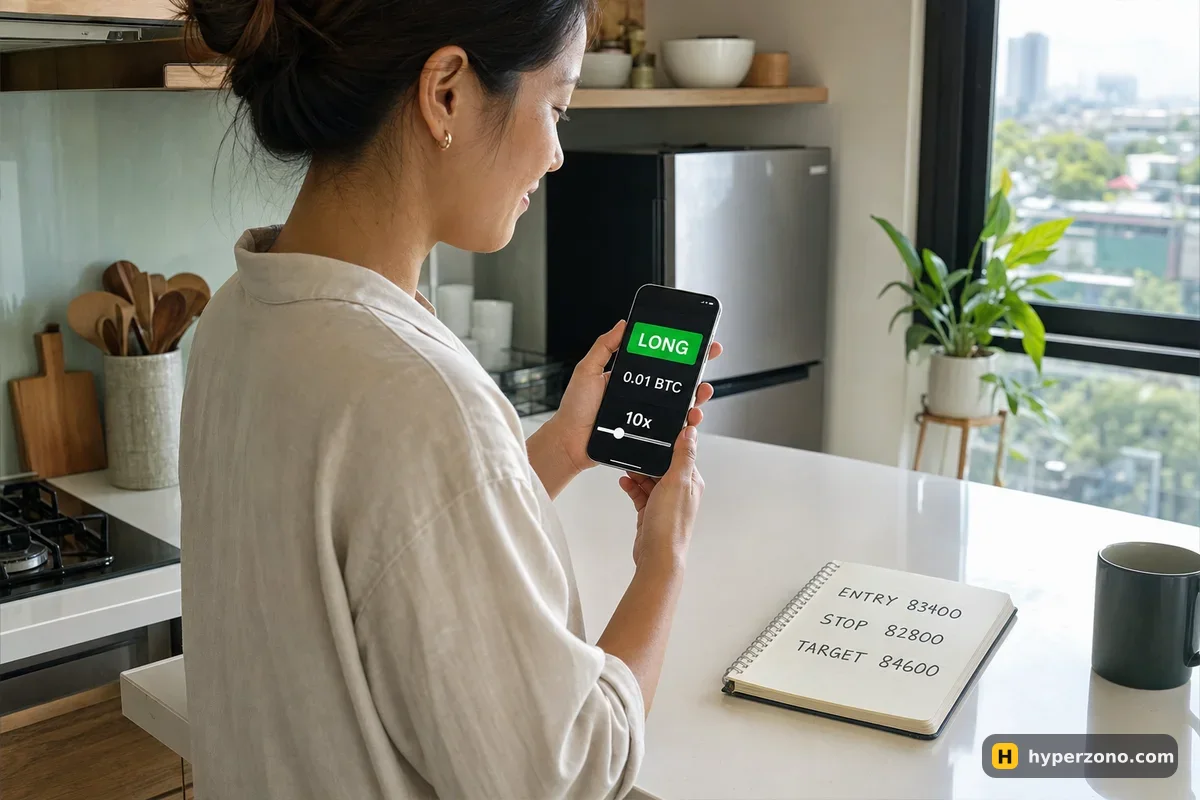
Here is the example we will carry through the whole page (illustrative numbers). Your futures account has 300 USDT. You are willing to risk 2% of it on one trade, so 6 USDT. You plan to enter at 83,400 and put the stop at 82,800, just under the area where price bounced. The distance is 600 USDT per 1 BTC. Your quantity is 6 ÷ 600 = 0.01 BTC.
A position of 0.01 BTC at 83,400 is worth 834 USDT. At 10x leverage the exchange holds about 83 USDT of your balance as margin, and the rest of your money stays free. Leverage here is not a decision about profit — the quantity is already fixed by your risk, so leverage only decides how much of your balance gets locked while the trade runs. More on that in what leverage a beginner should use.
One practical limit: contracts have a minimum size. On Binance the smallest bitcoin position is 0.001 BTC, so 0.01 BTC is comfortably above it; other exchanges set their own minimum, which you will see in the order window when you type a quantity that is too small.
Market or limit: how to actually get in
A market order buys right now at whatever price is available — you are in within a second, and you pay the slightly higher fee, because exchanges charge a bit more when you take a price that is already sitting there than when you wait with your own price. A limit order says "buy me 0.01 BTC at 83,400 and not a cent more", and it waits until price comes to you.
For a long against a level, the limit order is usually the better choice. You already decided that 83,400 is the price you want; chasing a candle upward with a market order means paying 50 or 100 USDT more per bitcoin, which pushes your stop distance out and quietly makes the trade worse. The trade-off is honest: sometimes price never comes back and you get no trade at all. That is a fine outcome — the easiest way to feel the difference is to open a Binance Futures account and watch your limit order wait on the screen at 83,400 while the price moves around it.
Where the stop goes and where the target goes
The stop goes just below the area where bitcoin bounced before — the same area you bought against — not at a round number that looks nice. Price bounced around 83,000, so the stop goes under that, at 82,800. If bitcoin trades down there, the reason you entered has stopped being true, and you want out for 6 USDT rather than arguing with the chart. Setting one is a two-minute job: see how to set a stop loss.
The target is measured in the same units as the risk. Traders call one stop distance "1R". Your R here is 600 USDT of bitcoin price, so a target at 2R sits 1,200 above the entry: 84,600. That is a move of about 1.4% in bitcoin — ordinary, not a fantasy. If you win 12 USDT when you are right and lose 6 USDT when you are wrong, you can be wrong more often than right and still finish ahead. Use a take profit order so the exchange closes the trade for you while you sleep.
Set the stop in the same minute you enter. A stop you plan to add "after I see how it goes" is a stop that never gets added. Most apps let you attach the stop and target to the order before you send it, in the same window where you type the quantity. If yours does not, add them the second the position appears.
Move USDT to the futures wallet
Money you deposit usually lands in a different wallet from the futures one. Use the transfer button in the app to move your USDT to the futures account, otherwise the order window will show a zero balance.
Open the BTCUSDT perpetual
Search BTCUSDT and make sure you are on the USDT-settled perpetual contract, not spot. Spot and futures look similar and sit under different tabs.
Choose isolated margin and your leverage
Isolated keeps the risk inside the margin of this one position. Set 10x for our example, confirm, and you will see the margin required update.
Pick the Limit tab and type the price
Price 83,400. Quantity 0.01 BTC — some apps let you switch the quantity field between BTC and USDT, so check which unit you are typing in.
Attach the stop and the target
In the same window, tick the box for stop loss and take profit: 82,800 and 84,600. Check the estimated loss and profit the app shows you — roughly −6 and +12 USDT.
Tap Buy / Long and let it work
Your order appears in the open orders list. When price touches 83,400 it fills, the position shows up with its entry price, and the stop and target go live.
How this long ends, in money
Two outcomes, both planned before you clicked. If bitcoin runs up to 84,600, the take profit fires and you keep 12 USDT. If it slides to 82,800, the stop fires and you are out for 6 USDT. Fees come off both of those, charged on the size of the trade rather than on your margin — on Binance's standard level that is 0.05% when you take a price already on offer and 0.02% when you wait with your own, so on a position of around 834 USDT, entry and exit together cost well under a dollar. The exact rates for your level are on the exchange's fee page, and the whole subject is in what fees you pay on futures.
On a normal move the stop fills right about there. On a sudden drop it can fill a bit lower, so treat 6 USDT as the plan, not a promise — the reasons are spelled out in does a stop loss guarantee your loss.
| What happens | Price | Your result |
|---|---|---|
| Target hit, trade closes in profit | 84,600 | +12 USDT, about +11.4 after fees |
| Stop hit, trade closes in loss | 82,800 | −6 USDT, about −6.6 after fees |
| Price goes nowhere, you close by hand | 83,400 | Roughly flat, minus the fees |
Notice what the stop is doing for you. At 10x, the price where the exchange would close the position itself — liquidation — sits very roughly 10% below your entry, somewhere around 75,000. Your stop sits 0.7% below entry. You never get close to the exchange taking over, because you exit long before that on your own terms.
Isolated long of 834.00 USDT, 10× leverage, maintenance margin 0.50% of position size (example). Simplified model without closing fees, risk-limit tiers or other positions — the exchange will show its own price.
If something does not go to plan
Your limit order never fills. Bitcoin stopped 40 USDT above your price, turned back up and never came down to 83,400. Cancel the order and wait for the next setup — a missed trade costs nothing, a chased trade costs real money.
The app says you do not have enough margin. Either the USDT is still sitting in the wallet you deposited into and you have not yet moved it to the futures account, or the quantity you typed is bigger than you think. Check which unit the quantity field is using: 0.01 in the BTC field is a 834 USDT position, but 0.01 typed into a USDT field is nothing at all, and 10 typed into the BTC field is a position worth more than your whole account.
The order gets rejected as too small. Raise the quantity to the contract minimum, or if that minimum does not fit your 6 USDT of risk, pick a cheaper coin where small sizes are allowed, or accept a slightly different risk — never widen the stop to make the maths work.
Your leverage choice is capped. On Binance, leverage above 20x is not available during the first 30 days of a futures account, and high leverage shrinks as the position gets bigger on every exchange. For this trade it changes nothing: 10x is enough to hold an 834 USDT position with 83 USDT of margin.
The trade goes against you and you want to move the stop. That is the moment the plan is actually tested. Moving a stop further away turns a 6 USDT loss into an unknown one, and that single habit is behind most blown beginner accounts.
Run it once before you run it with money
Everything above takes about three minutes once you have done it twice. The quickest way to get those two repetitions is demo mode, where the order window, the stop field and the position list behave exactly as they do live. You can open a Binance account and look for Demo Trading — it is not offered in every country, so if you do not see it, place the same sequence live with the smallest size the contract allows. The screen-by-screen version is in how to try Binance futures in demo mode and how to trade futures on Binance step by step.
One thing to check while you sign up: futures are not available everywhere, and in some places an exchange serves you through a local company with different products or lower leverage caps. The app tells you during registration, so read what it says rather than assuming.
How much money do I need to long bitcoin?
Much less than one bitcoin. In the example above, a 0.01 BTC position worth 834 USDT needs about 83 USDT of margin at 10x. On Binance the smallest bitcoin position is 0.001 BTC, which at a price near 83,500 is roughly 83 USDT of position size — with about 25 USDT of margin you can open it from 5x leverage. Other exchanges set their own minimums, so check the contract details in the app.
Is going long the same as buying bitcoin on spot?
The profit moves the same way, but you own nothing. On spot you buy a coin and it stays in your wallet until you sell. With a long futures position you hold a contract, you can use leverage, you pay or receive funding while it is open, and the exchange can close you out if the price moves far enough against you.
Can I open a long without leverage?
You can set leverage to 1x, and then your position size equals the margin you put in: 100 USDT of margin, a 100 USDT position. The price moves have exactly the same effect in money as they would on spot, and liquidation becomes extremely unlikely, because the price would have to fall nearly all the way to zero. Many beginners do their first few live trades this way.
What happens if my long goes down and I have no stop?
The loss keeps growing until either you close it or the exchange does. The exchange closes it when your margin runs out, which is called liquidation, and at that point the margin on that position is gone. With a stop at a planned price you decide the number instead — around 6 USDT in our example rather than 83.
How long can I keep a long position open?
Perpetual contracts have no expiry date, so a long can stay open for days or weeks as long as you have margin. The cost of holding is funding, a small payment exchanged between longs and shorts every few hours — when the rate is positive, longs pay shorts. On a position of this size held for a few hours it is usually a tiny amount, but the app shows the current rate next to the contract, so check it there.
Should I use market or limit for my very first long?
Limit, in almost every case. It makes you name a price before you act, which is half the discipline, and waiting with your own price is also the cheaper side of the fee. Use market only when you need out of a position right now and the price you get matters less than being out.