Contents
What you can trade on VariationalWhy there is no trading fee, and what you still payHow to sign up for Variational, step by stepFinding your way around the terminal and opening a first tradeVariational points and the VAR airdropHow to withdraw from VariationalCan you use Variational on your phone?Where your money is, and what to keep in mindWho Variational suitsFrequently asked questionsSkip to sign-up Already decided to try it? Jump to the step-by-step sign-up — seven steps from wallet to first deposit.
What you can trade on Variational
Say you have a bitcoin idea today, a gold idea before next week's Fed meeting, and later you want to bet on the whole US stock market. Usually that means a crypto exchange, a broker and one more app. On Omni all of these sit in one catalogue, and switching between them takes a couple of clicks.
When we checked on 22 October 2026, the Markets page listed 580 markets: 433 crypto and 147 traditional ones, which Omni calls TradFi. Variational's own pages say "550+", and the number keeps changing, so think of it as "hundreds of markets" and check the live list in the app.
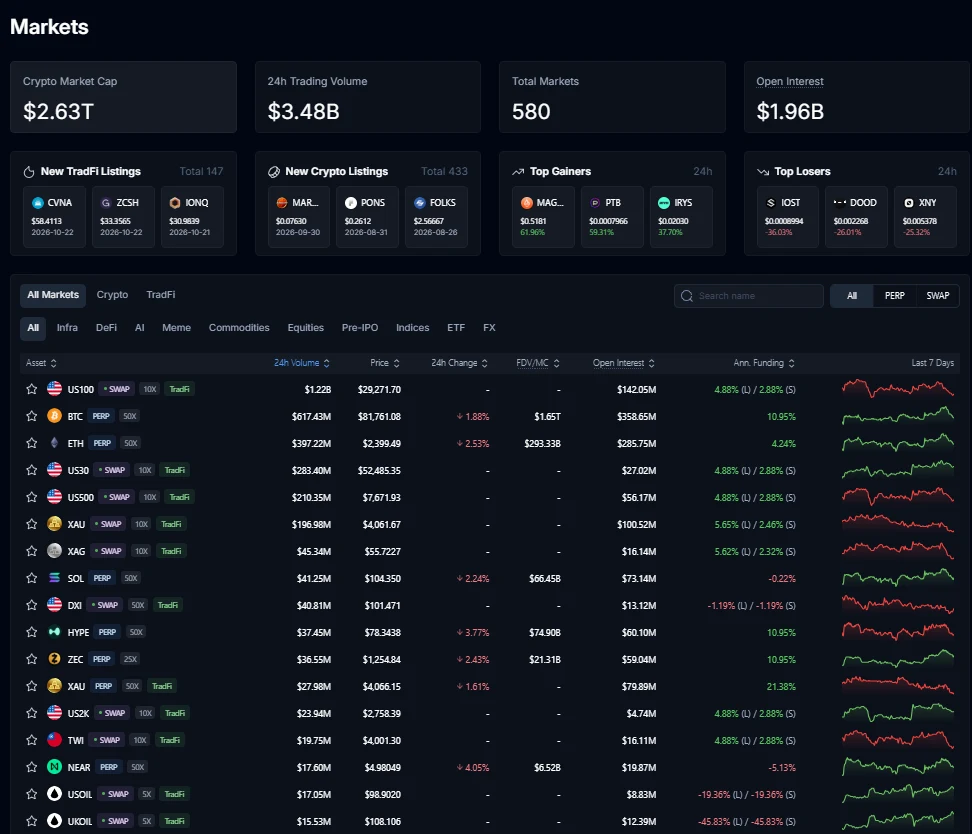
You can filter the catalogue by what you want to do. Here is what is in it:
- Crypto. BTC, ETH, SOL, HYPE and hundreds of other coins. The majors go up to 50x — BTC-PERP and ETH-PERP, for example.
- Stocks. Contracts on the price of individual companies such as Nvidia — handy if you follow a company's earnings and want to trade the move.
- Indices. US500 (S&P 500), US100 (Nasdaq-100), US30 (Dow Jones) — a bet on a whole group of companies rather than one.
- Metals and commodities. Gold (XAU), silver (XAG), WTI oil (USOIL) and Brent (UKOIL).
- Currency pairs and the dollar index (DXI).
- Pre-IPO. Contracts on companies that have not listed yet, such as OPENAI and ANTHROPIC.
Be clear about what you are buying. It is not the share itself or a bar of gold but a derivative contract on its price: you gain or lose on the price change, and you never own the stock. Dividends do not vanish completely, though: before the ex-dividend date on stock and ETF contracts, Omni runs a special "dividend funding" in which shorts pay longs an amount matching the dividend. For a couple of hours before that the contract only lets you reduce positions.
PERP and SWAP: why gold has two contracts
In the catalogue each market is tagged PERP or SWAP, and one asset can have both — XAU-PERP with up to 50x and XAU-SWAP with up to 10x, for example. They trade separately, and the difference matters.
A PERP is a perpetual future: it trades around the clock, weekends included, even for stocks and gold. Funding — the regular payment between buyers and sellers, explained below — settles every 1 to 8 hours depending on the market. A SWAP is tied to the traditional market: most swaps trade about 23 hours a day, five days a week, and close at weekends. While a swap is closed everything pauses — new orders, take-profits, stop-losses and even liquidations; they are processed when it reopens. Swap financing is charged once a day, the long and short rates differ, and margin is isolated only.
So a simple rule: if you want to hold through the weekend and react at any moment, look at the PERP. If you want the link to the real market and can live with its hours, look at the SWAP. Other venues offer similar markets too — see our perp DEX comparison — but Omni's "everything in one window" range is among the widest.
Pre-IPO — interesting, with special rules
Contracts on OpenAI or Anthropic let you take a view on a company's value before it lists. This is not buying shares before an IPO: until the listing, the contract price comes from an aggregate of external venues that already trade such contracts, and funding is fixed at 0.005% per 8 hours. After the IPO the contract turns into a regular one as soon as an exchange price is available.
Variational warns that these markets are less stable — sharp wicks and liquidations happen more often, and the platform reserves the right to delist the market and force-settle positions. Treat pre-IPO as an extra for people who already understand the mechanics, not as a market for a first trade.
Why there is no trading fee, and what you still pay
Omni's headline is a 0% trading fee for everyone: nothing extra for buyers or sellers, on opening or closing, whatever the size or market. On a regular exchange that is a noticeable cost.
A rough comparison Say another venue charges 0.05% per trade. You open a 1,000 USDC position and later close it: 1,000 × 0.05% + 1,000 × 0.05% = 1 USDC in trading fees. On Omni that line is zero. The 0.05% is just for illustration; judge a trade by its quote and funding as well.
The platform still earns money, and it helps to know where that comes from and what you really pay:
- Spread. The gap between the buy and the sell price in the quote. There is no order book on Omni: the platform's market maker quotes you, and its income is in that gap. The Spread line in the order form shows half the buy–sell gap for your size.
- Funding. A regular payment between longs and shorts on perpetual contracts. It can be a cost or an income, depending on your side and the rate. More in what funding is.
- Transfers. 0.1 USDC per deposit and per withdrawal. No network fee on top — you do not need ETH for gas.
- Liquidation. If a position is closed by force, a 0.5% penalty applies to the part that is closed.
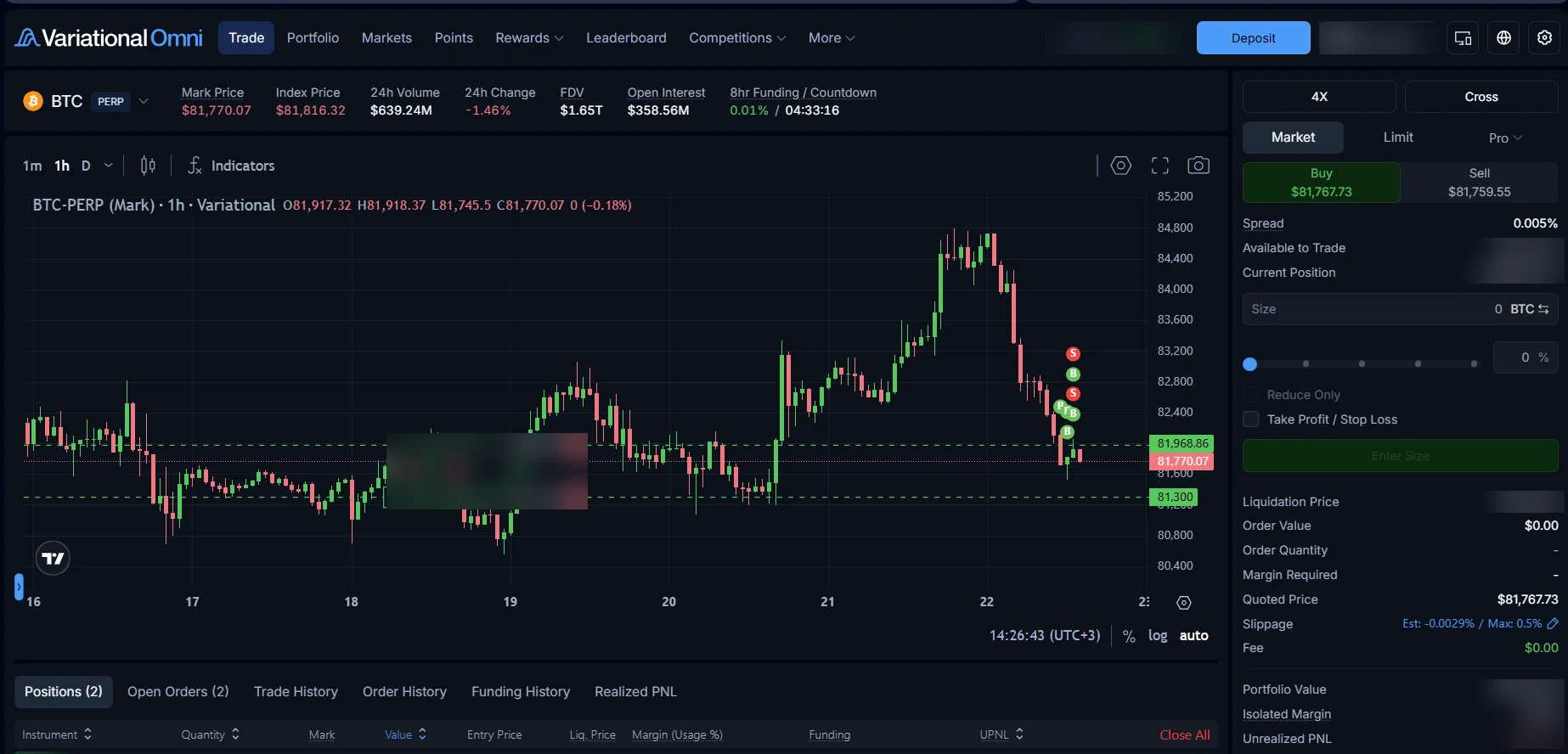
Look at the terminal screenshot: on BTC the buy quote is $81,767.73, the sell quote $81,759.55, the Spread line says 0.005% and the Fee line says $0.00. For a 200 USDC position that is about 0.01 USDC of spread going in and about the same coming out. BTC funding at that moment was 0.01% per 8 hours: on the same position, about 0.02 USDC every 8 hours if the rate holds. That is how you see what a trade costs right now — more useful than any "deep liquidity" promise.
On perpetuals the funding interval depends on the market, from one to eight hours; BTC, ETH, SOL and Nvidia were on 8 hours when we checked. The payment happens only at the end of the interval. If you compare rates across venues, see how to compare a 1-hour funding rate with an 8-hour one. Swaps work differently: financing is charged daily and tied to the cost of money in traditional markets, so the catalogue shows separate annual rates for longs (L) and shorts (S).
How to sign up for Variational, step by step
Signing up for Omni is not like a regular exchange. There is no login and password and no document upload: your account is a crypto wallet, and you confirm sign-in with a signature. If your wallet and USDC are ready, it takes a few minutes.
First, the access code Omni is still in private beta: you cannot create an account without an access code. The code is another trader's referral code (or your address on a whitelist). If you open Omni through a referral link like omni.variational.io/?ref=CODE, the app fills the code in for you. If you have no invite, the app suggests asking for a code in the official Variational Discord. The team plans to open public access "in the final weeks before" the token launch, after which no code will be needed.
Step 1. Get a wallet ready
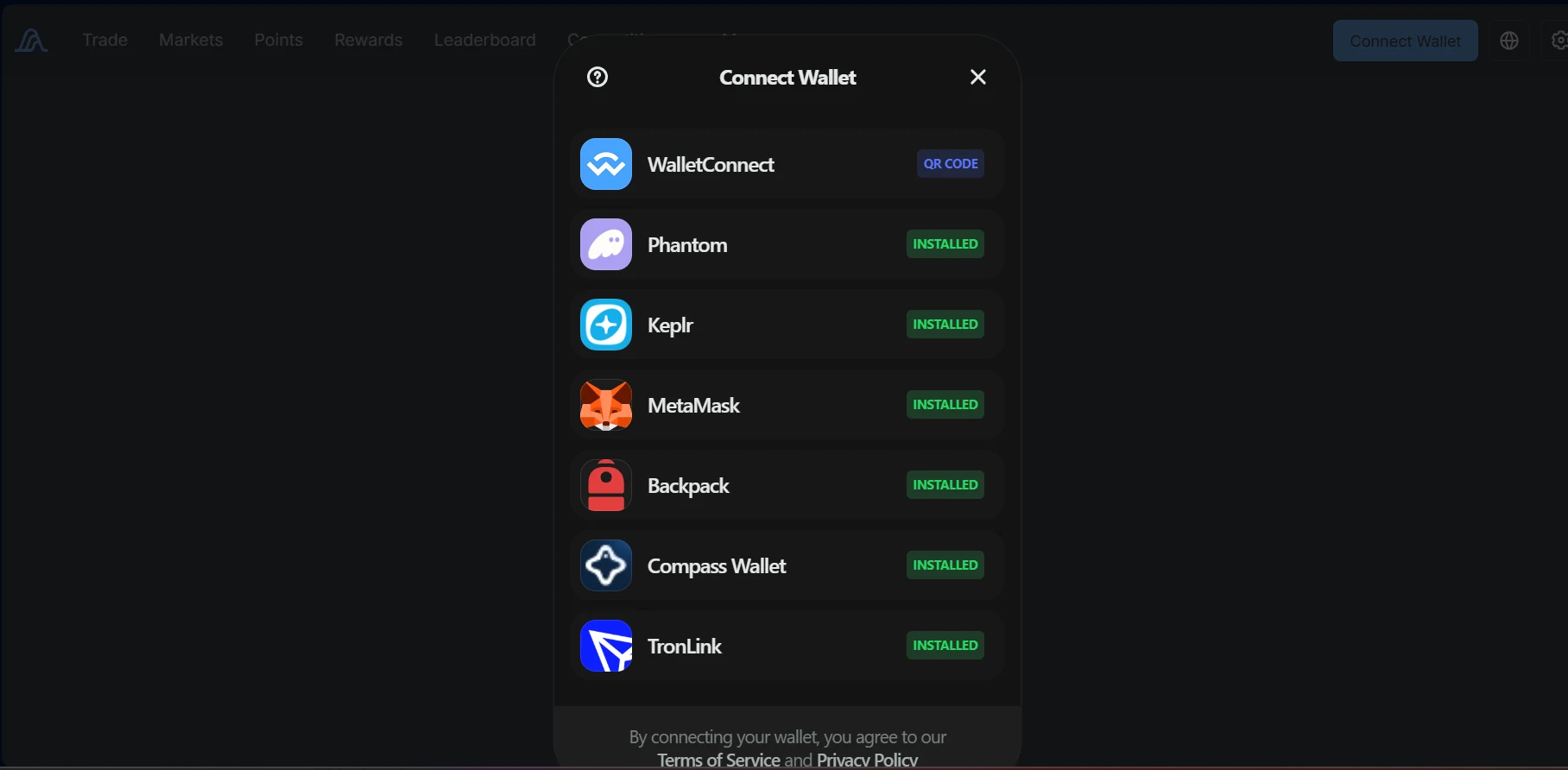
The wallet replaces a login: you sign in with it, confirm actions with it, and withdrawals come back to it. Variational's help centre names three options: Rabby (recommended, it switches to Arbitrum by itself), MetaMask (select Arbitrum One manually) and WalletConnect, which links a mobile or hardware wallet by QR code. Any other Ethereum-compatible wallet works too. Result: a wallet is installed and its recovery phrase is stored somewhere safe.
Step 2. Open the official app
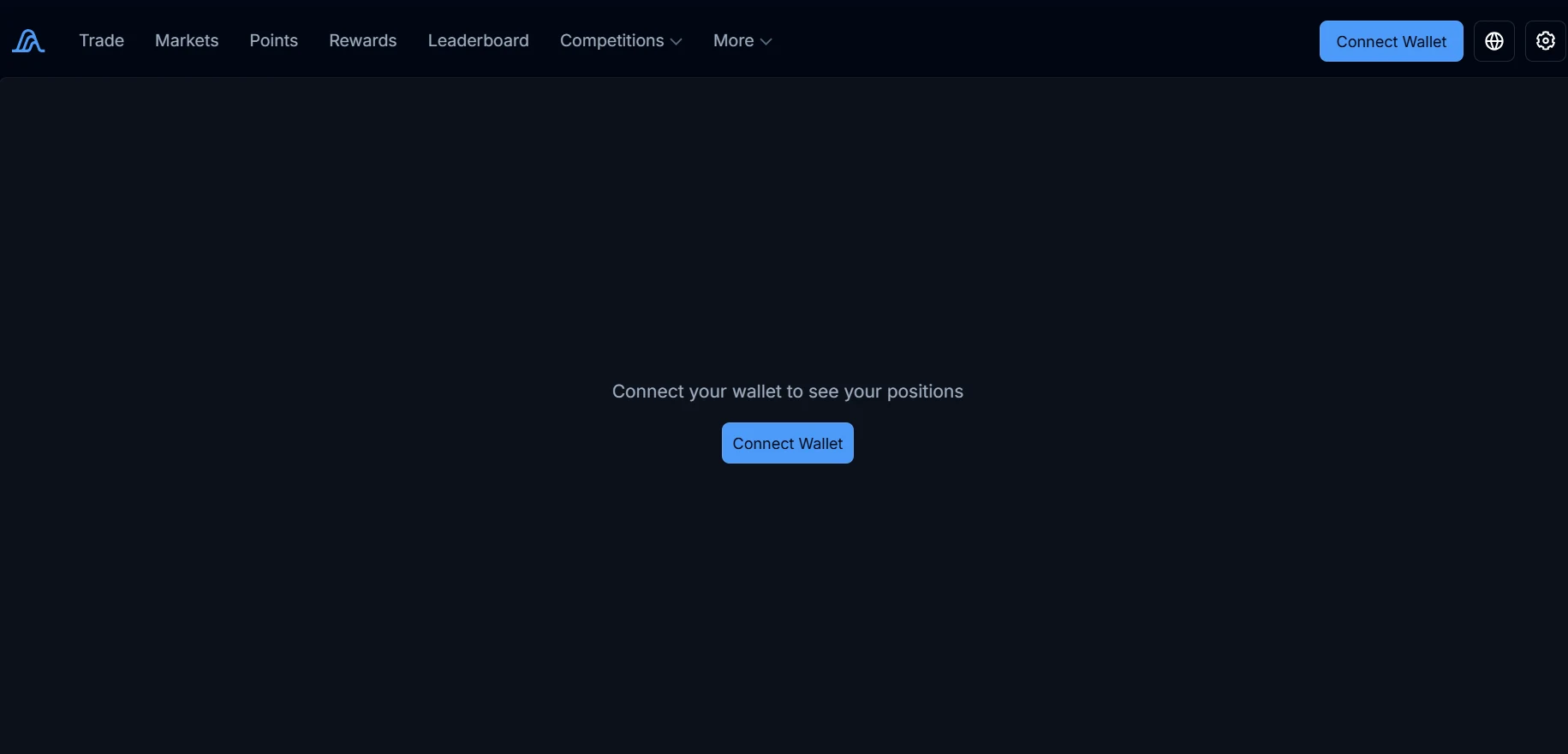
The app lives at omni.variational.io. Check the address bar: look-alike sites are a common way to drain wallets. If you see an Access Restricted screen instead of the app, the platform is not available where you are. Result: the Omni terminal is open with a Connect Wallet button.
Step 3. Connect your wallet
Click Connect Wallet and pick your wallet. The app lists the wallets installed in your browser, so everyone's list looks different. Approve the connection in the wallet pop-up. Result: a shortened wallet address appears in the top-right corner.
Step 4. Enter the access code
If you came through a referral link, the code is already there. If not, type it into Enter Access Code. Note that an applied code cannot be changed later. Result: the app accepts the code and moves on to the terms.
Step 5. Finish signing in
Accept the terms of use and confirm you are not a restricted person. Wait while the portfolio is created — a settlement smart contract is deployed for you at this point. Then click Authenticate and sign the message in your wallet. The signature is free and moves no money. Result: the account exists and you are in the terminal.
Step 6. Deposit
Omni accepts only USDC on Arbitrum One — not USDT, and not USDC on another network. If your USDC is on an exchange, withdraw it to your wallet on Arbitrum One. Then click the blue Deposit button at the top right (the help centre may call it Transfer), enter the amount, click Deposit and sign the permission. No ETH is needed, and 0.1 USDC is taken per deposit. Funds usually arrive within seconds once the Arbitrum transaction confirms. The docs give no minimum amount.
Step 7. Check the result
Your portfolio value appears at the top right, and the order form shows Available to Trade. There is no rush to trade: open Markets, pick one, and watch how the quote, spread and required margin change with size — that costs nothing.
If you have never connected a wallet to a decentralised venue, our guide to what connecting means and which signatures are safe covers the same principles using Hyperliquid as the example.
Finding your way around the terminal and opening a first trade
The Omni terminal looks like most exchanges: chart on the left, order form on the right, your positions and orders at the bottom. Let's walk through a first trade as a list of tasks.
Find the contract
Click the market name above the chart or open Markets and search. Note the PERP or SWAP tag and the maximum leverage next to the name.
Pick a direction
Buy is a long — you gain if the price rises. Sell is a short — you gain if it falls. The buttons show the current buy and sell price.
Set leverage and margin mode
Above the form are two buttons: leverage (for example 4X) and the mode, Cross or Isolated. Leverage is set per market. You cannot switch the mode while that market has an open position or order.
Enter the position size
The Size field takes the size of the position itself — in coins or dollars (the arrows icon switches units) — or a share of your available funds via the slider. This is not your collateral: collateral is the size divided by leverage.
Check the quote and the numbers
Below the form you will see Order Value, Margin Required (how much collateral the trade ties up), Liquidation Price, Quoted Price and Slippage. Change the size or leverage and they update.
Plan your exit
Tick Take Profit / Stop Loss and set the levels at which the trade closes by itself — in profit or with a limited loss.
Confirm and find the position
Click Buy or Sell. The position appears in the Positions tab at the bottom; limit and protective orders are under Open Orders.
Change or close it
From the position row you can close all or part of it, flip it to the other side, and add or remove isolated margin. Open orders can be edited with the pencil icon and cancelled with the cross.
Worked example: 100 USDC at 2x You set aside 100 USDC of collateral and choose 2x leverage — a 200 USDC position. A 2% move in your favour gives about +4 USDC; a 2% move against you, about −4 USDC. That is before the spread (on BTC in our example, about 0.02 USDC in and out) and funding. This is a teaching calculation, not the author's real trade and not a minimum size.
Notice that the dollar result depends on the position size, not the leverage. Open the same 200 USDC at 4x and a 2% move gives the same result — you just tie up 50 USDC instead of 100 and have less room before liquidation. More in how leverage affects profit and which leverage to pick for a first trade.
Market, Limit and Pro
Market executes at once at the current quote. An Omni detail: if the execution price would be further from the fair (mark) price than your slippage limit allows, the market order is rejected rather than filled at a bad price. You change the limit with the pencil in the Slippage row — 0.5% in our screenshot.
Limit fills when the market maker's quote reaches your price, and fills in full — partial fills are not available yet. The Pro tab adds trigger orders and standalone TP/SL orders. Limit, trigger and TP/SL orders last up to 120 days.
Cross and Isolated
In Cross mode (the default) all positions share one pool of collateral: a winning trade supports a losing one, but a big loss can reach your whole balance. In Isolated mode each position gets its own collateral, and if it goes wrong you risk only that. Isolated is available on some perpetual markets, and it is the only option on swaps. More in cross vs isolated margin.
Take profit, stop loss and Reduce Only
The Reduce Only box stops an order from accidentally growing or flipping a position — it can only shrink it. All TP/SL orders on Omni work that way anyway. They trigger on the mark price (you can choose the quote instead) and execute as market orders.
Two practical tips. First, a TP/SL executes only if the estimated slippage fits within your limit — with a very tight limit, in a fast move a protective order can sit pending. If the slippage limit matters to you, set protection from the Pro tab: the app warns that TP/SL added from the main form does not get one. Second, after a partial close, check what happened to your protective order. There is a setting that resizes it to the smaller position (the docs call it Auto-Resize); if it is off, the order can be cancelled. For how these orders work in general, see setting a stop loss and take profit together.
Variational points and the VAR airdrop
Points are what Variational awards for activity on Omni. The platform has announced that when its VAR token launches, 32% of the total supply will go to points holders in proportion to their points. That is why many traders watch their points as closely as their PnL.
Where to see them. Your balance and history are under Points in the top menu. Points belong to your wallet address and cannot be moved to another one.
When they arrive. Points are distributed weekly: every Friday at 00:00 UTC for activity up to Thursday 00:00 UTC. So points do not show up right after a trade — wait for the next Friday. The app has a countdown to the next distribution.
How they are calculated. The exact formula is not public. Variational says trading volume is one factor but not the only one. There are also boosts: your account tier adds +0% to +5%, and the code you signed up with may carry its own boost.
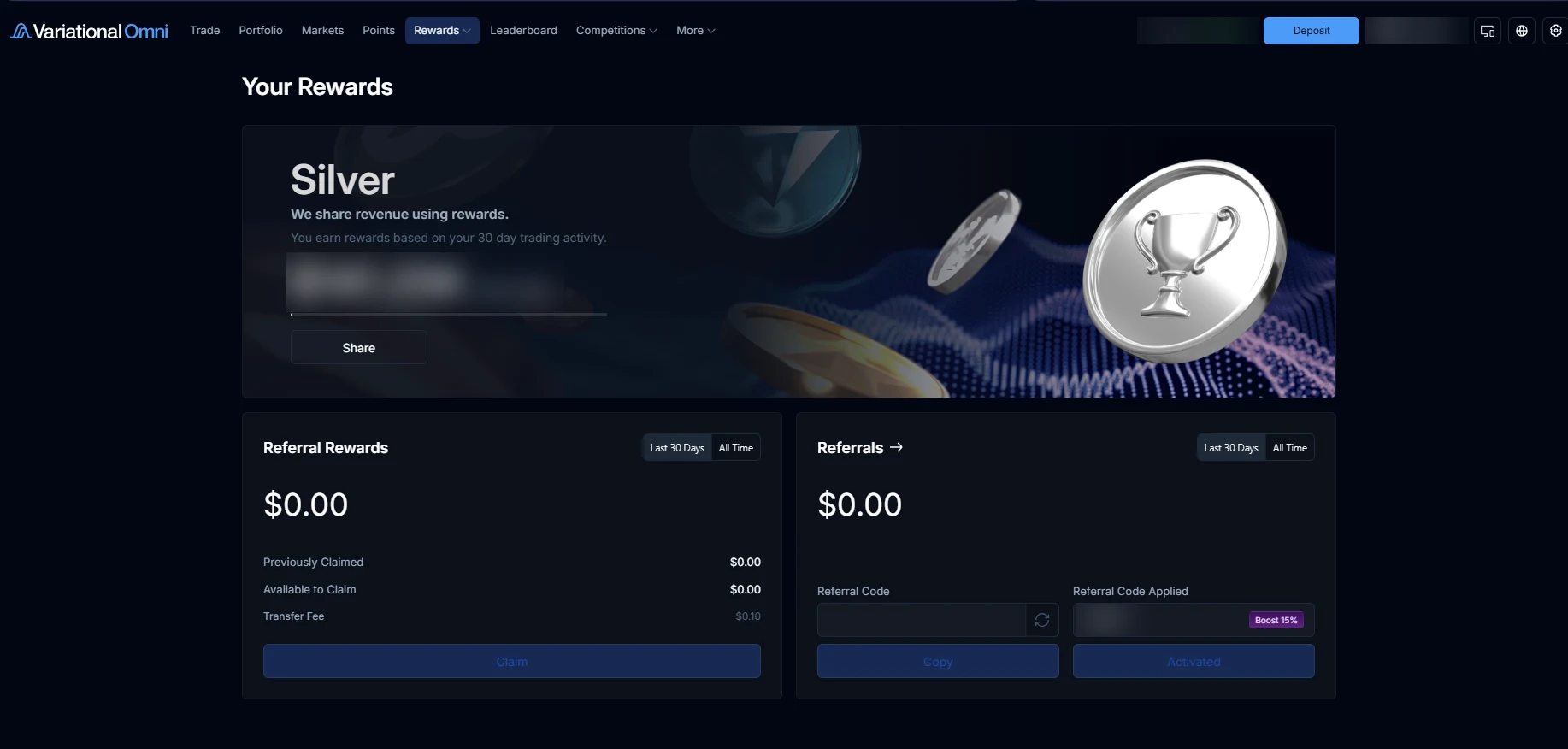
Tiers. Your tier depends on trading volume over the last 30 days: Iron from zero, Bronze from $1M, Silver from $5M, Gold from $25M and on up to Infinity. Higher tiers get a bigger points boost; the trading fee is zero on every tier. Variational marks some tier perks as work in progress.
The invite-code boost. On the Rewards page, next to the code you applied, Omni shows its boost — Boost 15% in our screenshot. The platform sets this value per code and does not document it, so no one can promise you a specific percentage: check what your own screen shows after you sign up.
What has been announced about the token. VAR is due in Q4 2026, with no exact date. Of the total supply, 32% goes to points holders and unlocks at launch, 18% to an ecosystem reserve, and 50% to the team and investors with a one-year lock. To claim your share you need at least one point and must sign the token terms; unclaimed tokens are burned. The team says weekly points continue until the token launch, and no later than the end of 2026.
Why you cannot put a dollar figure on it yet. The token price, the total number of points at distribution and the number of VAR per point are all unknown. Variational's terms say points give no right to a token and can be changed. Treat them as a bonus on top of trading, not a reason to trade more or with higher leverage. For how to value programmes like this, see trading rewards, points and airdrops.
Loss refunds are over. If you have read about a programme in which Omni refunded part of losing trades, it has been discontinued, and the docs mark it as closed.
How to withdraw from Variational
Withdrawing is the deposit in reverse, and it is gasless too:
- Click the Deposit (Transfer) button at the top right and open the Withdraw tab.
- Check the amount available to withdraw.
- Enter the amount and confirm the withdrawal with a signature in your wallet.
- Check that the USDC has arrived in your wallet on Arbitrum One. 0.1 USDC is taken per withdrawal.
The amount you can withdraw can be lower than your portfolio value. With open positions, part of your funds is tied up as their collateral, and only the free balance can leave. To withdraw everything, close your positions first.
Money goes back only to the wallet connected to the account — you cannot send it to someone else's address or straight to an exchange. From there it is yours to use as usual, for example sending USDC to an exchange to sell. That is a separate transfer with its own rules and fees, so on the exchange pick the same network, Arbitrum One. The platform does not promise a specific withdrawal time, and neither do we.
Can you use Variational on your phone?
Omni has no separate app in the App Store or Google Play, and you do not need one: the terminal runs in your phone's browser. There are two handy ways to use it.
Add it to your home screen. Open omni.variational.io in your phone's browser, tap Share and choose Add to Home Screen — you get an icon that opens Omni like an app.
Link your phone to your computer. If your wallet is on your computer but you want to watch a position from your phone, use the QR sign-in. On the computer click Link Mobile Device; on the phone tap Connect Wallet → Link Desktop Wallet; type the six-digit code shown on the phone into the computer and sign; then scan the QR code. The link lasts 7 days, with up to 10 sessions at a time. Never show this QR code or sign-in codes to anyone: they give access to your account.
A third option is to connect a mobile wallet directly through WalletConnect. Either way you get the same terminal on your phone, with positions, orders and close buttons where you expect them.
Where your money is, and what to keep in mind
To use the platform with confidence, it helps to tell apart the three places your funds can be:
- Your own wallet. Only you hold its keys; Variational does not store them and cannot move that money.
- Your settlement pool. When you deposit, USDC moves from your wallet into your settlement pool — a smart contract on Arbitrum between you and the platform's market maker (OLP). This is no longer a free balance in your wallet: your collateral sits here and positions are tracked here. Each user's pool is isolated from everyone else's.
- Isolated margin on a position. If you opened a trade in Isolated mode, part of your funds is assigned to it and returns to your balance when you close.
The second thing to understand is who is on the other side of your trade. On Omni it is the platform's market maker, the Omni Liquidity Provider (OLP). It quotes your prices and is the counterparty to every trade, and it hedges its own risk on outside crypto and traditional markets. That is what gives you a quote for your size, but it also means execution depends on a single counterparty; Variational documents what happens if the OLP itself is liquidated.
Variational's smart contracts were audited by Zellic (December 2024) and Spearbit (March 2025), and a bug bounty on Immunefi pays up to $100,000. An audit lowers the risk of code bugs but does not guarantee your funds are safe. We found no official reports of incidents involving user funds. Variational support never messages users first and never asks for a recovery phrase — anyone who does in a private message is a scammer.
The other limits come with any leveraged trading. A position can be liquidated if collateral runs short, sometimes before the liquidation price shown: in Cross mode all positions count, and funding and the penalty play a part. See what liquidation is, and estimate your price in advance with the liquidation calculator. Swaps follow market hours, and access is restricted in several countries: the list includes the US, Canada, Taiwan and sanctioned territories, and the terms allow refusing access in other cases too. If you see an Access Restricted screen, the platform is closed to you.
The normal sign-up has no passport upload, but that is not a promise of no checks ever. The terms allow the platform to ask about the source of funds, and KYC is required for large referral payouts in certain campaigns.
Who Variational suits
Variational Omni is worth a try if at least one of these fits you:
- You want to trade different markets — crypto, stocks, gold, indices and currencies — in one interface with one USDC balance.
- You prefer signing in with your own wallet, with no login, password or document upload.
- You want to see the price for your size before trading and not pay a separate trading fee.
- You like points as a bonus on top of normal trading — knowing their value is still unknown.
What it asks of you: getting comfortable with a crypto wallet, getting USDC on Arbitrum One, and understanding how leveraged derivatives work — all covered above. And while the private beta lasts, you need an access code.
If you are comparing Omni with other venues you trade from a wallet, see the perp DEX comparison and our Hyperliquid guide — a different way of setting prices and a different market line-up.
Frequently asked questions
Do I need KYC on Variational?
Not in the normal sign-up: you connect a wallet and confirm with a signature, no passport upload. But the terms let the platform ask about the source of funds, and KYC is required for large referral payouts in certain campaigns.
Where do I get an invite code?
While Omni is in private beta you need a code to create an account. It is another trader's referral code, filled in automatically from a referral link. With no invite, the app suggests asking for a code in the official Variational Discord.
When do I get my own invite code?
Not right away. Your first referral code unlocks at $1M of trading volume, and each further $1M of trading or referral volume unlocks one more referral slot. You can also apply for Variational affiliate status.
Which wallet do I need?
An Ethereum-compatible wallet: Variational names Rabby, MetaMask and connecting through WalletConnect. It must work with Arbitrum One.
Which network and token do I deposit?
Only USDC on Arbitrum One. USDT and USDC on other networks are not accepted.
Do I need ETH for gas?
No. Sign-in, deposits and withdrawals on Omni are gasless. You only need ETH for your own transfers outside Omni, such as bridges.
What are Variational's fees?
The trading fee is 0% on every market and at any size. What remains: the spread in the quote, funding, 0.1 USDC per deposit and withdrawal, and a 0.5% penalty on liquidation.
Is there a minimum deposit?
The docs give no minimum. Just keep the fixed 0.1 USDC per transfer in mind: on a very small amount it shows.
What markets does Variational have?
Crypto, stocks, indices, metals and commodities, currency pairs and pre-IPO — 580 markets when we checked. The list changes; the live one is on the Markets page.
Does Omni trade 24/7?
Perpetuals (PERP) do, including stocks and gold. Swaps (SWAP) follow traditional markets: most trade about 23 hours a day on weekdays and close at weekends.
When are points credited?
Weekly: Friday at 00:00 UTC for activity up to Thursday 00:00 UTC. Points belong to your wallet address.
When does VAR launch and how much will I get?
Launch is announced for Q4 2026 with no exact date. 32% of supply goes to points holders in proportion to their points. A dollar figure cannot be worked out in advance, and points carry no guaranteed right to the token.
How do I withdraw from Variational?
Deposit (Transfer) button → Withdraw tab: enter an amount within what is available and sign. USDC arrives in your connected wallet on Arbitrum One; the fee is 0.1 USDC.
Can I trade on my phone?
Yes, in the mobile browser: add the site to your home screen as an app, or link your phone to a desktop session by QR code. There is no app in the stores.
Does Variational refund losses?
No. The loss-refund programme you may have read about has been discontinued, and the docs mark it as closed.
Sources and fact-check
Exchange terms were checked against official documents on October 22, 2026. Terms change — before you trade, check what matters to you in the exchange app and in your contract’s specs.
Variational: Getting started with OmniVariational Help Center: Creating an accountVariational Help Center: Depositing to OmniVariational: FeesVariational: SwapsVariational: Take profit and stop lossVariational: PointsVariational: $VARVariational: AuditsVariational: Restricted Persons